
ATC TRAINER

Practice air traffic control before your training starts.

An ATC simulator in your browser, made for students on their way to becoming controllers. Practice on your own at your own pace, or share a session with fellow students. Work Ground, Tower, Approach and Center positions on a live radar scope and talk to the traffic by voice. When you play together, you can also hand aircraft over to each other.

ATC Trainer is an independent project. It is not affiliated with, endorsed by or connected to EUROCONTROL, LVNL or any other air navigation service provider.

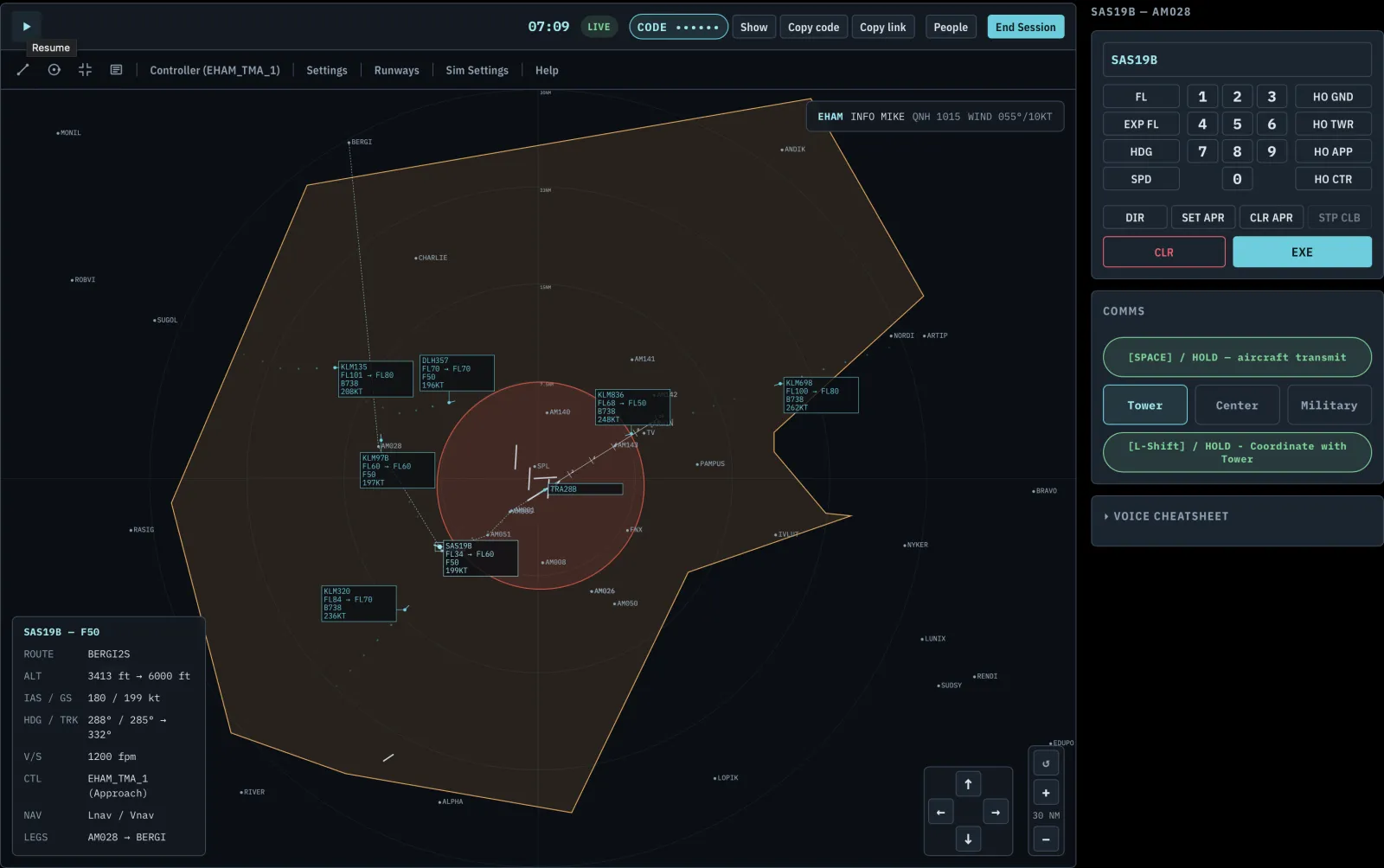
The ATC Trainer live radar scope, showing tracked aircraft and sector geometry

What can you do with it?

You are always the controller, never the pilot. Every aircraft on the scope is simulated traffic, so you can practice the part of the job that is hard to practice anywhere else.

Live radar scope

A real-time radar display with moving traffic, sector geometry, runway centerlines and a flight-plan panel for the aircraft you select.

Talk to the traffic

Give instructions by voice. Speech recognition turns them into commands, and the pilots read them back. Phone lines to neighboring sectors work the same way.

Real controller positions

Ground, Tower, Approach and Center, each with its own sector and handoffs. Positions nobody staffs are automated, so you can also practice alone.

Multiplayer sessions

Share a join code, pick a position each, and hand traffic over to each other like in a real operations room.

Scoring and replay

Every session is recorded and scored: handoffs, sequencing, separation, conflicts and more. Replay it afterwards and see where you lost points.

Build your own exercises

A World Editor for airports, routes, sectors and full scenarios, or start from the ready-made library. Scripted scenarios replay identically every time.

How it works

  1. 1

    Pick a scenario

    Choose a ready-made exercise or build your own, and take a control position.

  2. 2

    Control the traffic

    Issue headings, altitudes, clearances and handoffs by voice or with the keypad.

  3. 3

    Review your score

    Open the report, replay the session and try again with what you learned.

Why this exists

ATC Trainer is built by Luuk Wempe, who is preparing for a career as an air traffic controller. Practice material for the first steps of controller training is scarce, and practicing together is harder still. This is the simulator I wanted to have: a place to make mistakes with simulated traffic, get feedback on them and try again, together with the people in your class.

It is a beta, and it improves with the feedback of the first students who use it. Tell me what works and what does not.

Frequently asked questions

Is this free to use?

Yes. The Free plan lets you build and fly your own scenarios at no cost. Paid plans raise the limits and unlock extras such as a rotating or real-weather ATIS. See the plans under For individuals.

What does beta mean here?

The core of the simulator works, but you may hit bugs and rough edges, and features may change. Please report anything that looks wrong. Feedback from early users decides what gets fixed first.

Do I need Microsoft Flight Simulator?

No. Everything runs in your browser: traffic, radar and voice comms. A Microsoft Flight Simulator 2024 integration is planned for later, as an optional extra.

What level is this for?

It is built for people at the start of the road to becoming a controller: applicants who want to get a feel for the work, and students in early training who want realistic practice. It is a practice tool and not an official or certified training product.

Can I build my own airports and scenarios?

Yes. The World Editor covers airports, waypoints, routes, regions and full scenarios. Build from scratch or clone something from the built-in and curated library first.

Do I need to fly, or is this controller-only?

Controller-only. You always work a control position and never fly.

For individuals

Practice on your own or with classmates and friends. Start free and upgrade when you need more room.

Solo or together

Run a full session alone with automated neighbors, or invite classmates with a join code.

Your own scenarios

Build exercises that target what you want to improve, and replay scripted ones until they feel easy.

Works on tablets

Touch controls and pinch-to-zoom on the radar, with a layout that fits an iPad.

Plans

Start free. Upgrade when you outgrow it.

Free
You can try the full app with a limited number of airports/routes/scenarios
  • ✓ Areas 2
  • ✓ Airports 3
  • ✓ Aircraft Types 5
  • ✓ Airlines Unlimited
  • ✓ Waypoints 30
  • ✓ Routes 10
  • ✓ Regions 10
  • ✓ Scenarios 5
  • ✓ Library Clone
  • ✓ Speech-to-text Standard
  • ✓ Voices Standard voice
  • ✓ ATIS Static
Get Started
Basic
A bigger set of everything to build more scenarios and a high quality voice for a more immersive experience.
  • ✓ Areas 2
  • ✓ Airports 3
  • ✓ Aircraft Types 5
  • ✓ Airlines 3
  • ✓ Waypoints 30
  • ✓ Routes 9
  • ✓ Regions 6
  • ✓ Scenarios 6
  • ✓ Library Clone
  • ✓ Speech-to-text GPU-accelerated (fast)
  • ✓ Voices High Quality voice
  • ✓ ATIS Rotating
Get Started
Pro
Unlimited ways to train as an Air Traffic Controller. Multiple rotating voices create the most immersive experience.
  • ✓ Areas Unlimited
  • ✓ Airports Unlimited
  • ✓ Aircraft Types Unlimited
  • ✓ Airlines Unlimited
  • ✓ Waypoints Unlimited
  • ✓ Routes Unlimited
  • ✓ Regions Unlimited
  • ✓ Scenarios Unlimited
  • ✓ Library Clone / Publish
  • ✓ Speech-to-text GPU-accelerated (fast)
  • ✓ Voices 4-voice pool
  • ✓ ATIS Live weather (real METAR)
Get Started

For schools & organizations

Run a class on ATC Trainer: give every student practice time between lessons, and see how each one is doing.

Organizations & roles

Invite instructors and students into your own organization, with roles for who can author content, assign training and manage members.

Classes

Put students in a class that follows one curriculum, and see their assignments and results per class.

Curricula & assignments

Bundle scenarios into an ordered training program, optionally scored against your own rule set. Students can re-attempt them any time.

Instructor reports

Every attempt is scored by category, with a downloadable report per assignment and a link to the full session replay.

Progress tracking

Each student sees their best score and attempts per assignment, so practice between lessons stays visible.

Shared content library

Build an airport or scenario once and share it with every member of your organization.

Pricing

Organization pricing depends on the size of your group, so it is quoted per organization. We are looking for the first schools to try it, and early partners get a say in what is built next.

Organizations
For schools, training centers and ATC teams.
Custom
  • ✓Organizations & roles
  • ✓Classes, curricula & assignments
  • ✓Instructor scoring reports
  • ✓Shared content library
  • ✓Limits that fit your group
  • ✓Direct support
Contact us
Something went wrong on this page. Reload to continue 🗙